

BLOG
Over the last three DISQOVER releases, we've focused on one clear goal: giving teams more speed, more control, and more confidence at every step of the data discovery journey. From smarter search features to richer provenance visibility and a dramatic reduction in loading times, DISQOVER continues to evolve into a platform that meets users where they are.
Here's a look at what's new in DISQOVER 7.17, 7.18, and 7.19, and how these updates help teams find data faster, understand it more deeply, and act with greater confidence.
In 7.17, we refined the UI to improve the visibility of features and actions, helping users quickly locate what they need. Searches feel more focused, and optimized screen real estate means more results are visible without unnecessary clutter. In the same release, keyword search was made far more accessible — now placed at the top of the quick filters panel, with a simple "+" button to add it and the option to target specific properties for more precise results.

In 7.18, this momentum continued with a significant improvement to keyword search in the table overview. Partial matching is now supported. For example, searching for "gastro" will immediately surface entries containing "gastrointestinal." When working with multivalued data, any cell values that match your keyword are automatically promoted to the top of the cell, keeping them visible even when the cell holds more values than can be displayed at once. Matching text is highlighted in yellow directly in the table, giving full transparency into why each row appears in the results and building trust in the filtering workflow.
List search: a new way to start from what you already know
One of the most powerful new capabilities in 7.18 is list search. Users can now paste or type a list of labels or synonyms directly into DISQOVER Explore, and the platform instantly scans the knowledge graph to surface all matching concepts. This is especially valuable for teams working from a specific set of identifiers found on an external platform, or for quickly checking how well your internal data landscape covers a known list of entities.
Once results appear, users can dive deeper into any matched concept to explore its underlying instances.

Collaboration that builds on itself
In 7.18, DISQOVER Explore takes a meaningful step toward more collaborative, repeatable discovery. Any user can now save explorations and configure exactly who has access to them, whether that's a specific colleague or an entire user group. Owners stay in control, while teams gain the ability to build on each other's work rather than starting from scratch. This opens the door to more reliable, institutionalized discovery workflows that scale across departments.
DISQOVER 7.17 introduced persistent zoom states in chart views. When a user saves a view, the zoom level for each chart is preserved, so dashboards built for others look exactly as intended when they open them. This is a small but high-impact change for anyone curating data experiences for their team.
In 7.19, visualization control goes further. Users can now configure how many categories appear in charts, whether working with stacked or grouped bar charts, refining levels within a Sankey diagram, or adjusting bins in a histogram.
Sample size limits have also been decoupled from the view level and moved to the individual chart level in 7.19. This gives users more precise control to tailor sample sizes per chart depending on the data and visualization needs, rather than applying a single setting across everything.
Charts themselves also received a visual refresh in 7.18, with improved pie chart label rendering. Labels now display more consistently around the chart, reducing clutter and making even complex result sets easier to read at a glance.
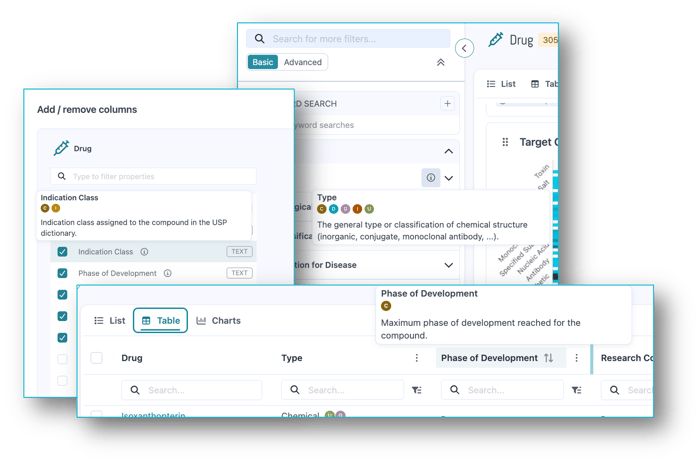
Confident decisions require knowing where data comes from. While provenance has been backed into DISQOVER since the beginning, recent updates have focused on improving and expanding the visibility of provenance across the platform. In 7.19, provenance information now reaches even more parts of DISQOVER Explore, including filter widgets, table column configurations, column headers, and the full filter overview. Data lineage is traceable at every step of the workflow, giving users and their colleagues greater trust in the insights they generate.
Performance has been a sustained priority across all three releases, and the results speak for themselves.
In 7.17, individual query processing times were reduced by 25–30%, with resource-heavy instance-level queries now handled separately to ensure the most critical searches get priority. That same release also brought significant speed improvements to importing source data from S3 or Azure Blob Storage, which now performs on par with local disk — simplifying how teams provision data to their DISQOVER instance. TTL exports to cloud storage became significantly faster as well.
In 7.18, result loading times were cut by a further 25% compared to the previous version. Combined with improved query prioritization, ensuring charts and filter refreshes populate in the most useful order, results now load at least four times faster compared to DISQOVER 7.14.
Want to see these features in action? One of our life sciences data experts would be happy to show you around the DISQOVER platform in a live demo for you and your team.
ONTOFORCE enables life science companies to unlock hidden insights from data.
With DISQOVER, built on knowledge graph technology, we support life sciences and pharmaceutical companies with innovative data management and visualization.